
Most test automation projects fail not because the team chose the wrong tool, but because they never built an architecture worth keeping. If your QA organization is inheriting a brittle test suite, rewriting automation for the third time in two years, or watching a framework get quietly abandoned after its original author left, the problem is structural, not technical, here is a guide on how to build a test automation framework from scratch in just 7 steps.
TL;DR
- Most automation failures are architectural, not tooling failures; choosing a framework before defining scope is the single most common mistake.
- A scalable framework requires seven foundational decisions made in the right sequence: scope, architecture, toolchain, folder structure, CI/CD integration, security and accessibility layers, and ownership protocols.
- Tool selection matters far less than the design patterns built around the tool; Playwright and Cypress can both produce unmaintainable test suites in the wrong hands.
- Security and accessibility testing belong inside the framework from day one, not appended after launch.
- Building from scratch is sometimes the wrong call; a QA process audit often reveals that the existing foundation is salvageable.
Most Automation Projects Fail Before the First Test Runs
Before a single test file is committed, most automation projects have already made the decision that will eventually kill them. A developer picks a tool they are comfortable with. Tests get written against the current UI. The suite passes locally. Then a sprint later, a layout change breaks forty selectors, a new team member cannot interpret the folder structure, and the suite stops running in CI because no one set up the pipeline integration.
This is not bad luck. It is the predictable outcome of skipping architectural decisions and jumping straight to writing tests.
The State of Testing Report consistently identifies test maintenance burden as one of the top reasons automation initiatives stall. Teams underestimate the cost of fragile tests and overestimate the value of raw test count. A suite with 2,000 tests that breaks on every minor UI update is a liability, not an asset.
The Director of QA who inherits that suite faces a specific kind of pressure: leadership sees automation as a solved problem because tests exist, but the team knows the suite is unreliable, the CI integration is flaky, and no one has touched the reporting layer in months. Rebuilding looks like admitting failure. Not rebuilding means the debt compounds.
Building a framework correctly the first time is the only way to break that cycle.
The 7 Steps to Build a Test Automation Framework That Actually Scales
Step 1: Define Scope and Automation Objectives Before Touching a Tool
Two questions look similar but have very different answers: “what should we automate?” and “what should we automate right now, given our current team size, product maturity, and release cadence?”
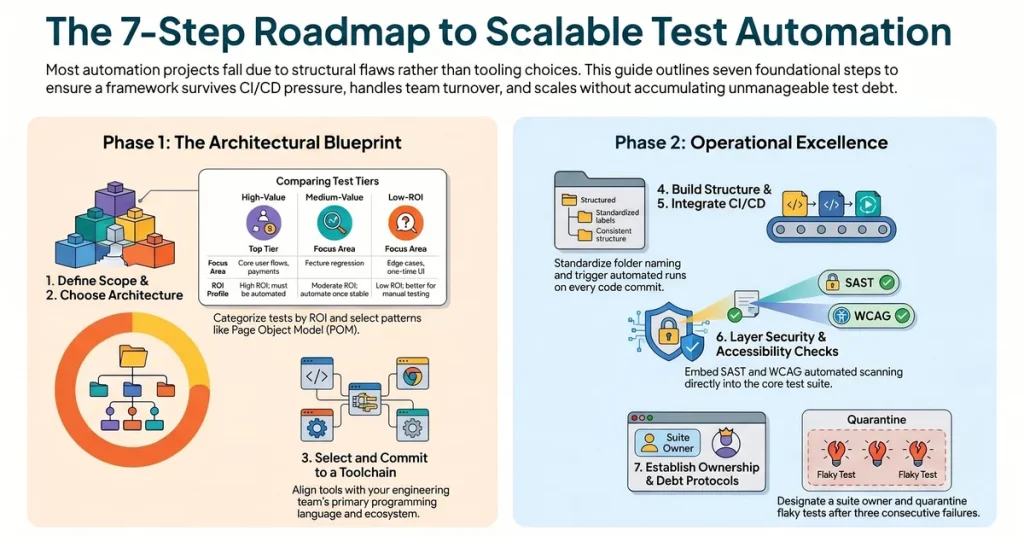
Start by categorizing your test surface into three tiers:
- High-value, high-stability candidates: Core user flows, payment paths, authentication, and data integrity checks that change infrequently but carry disproportionate risk if they break.
- Medium-value, medium-stability candidates: Feature-level regression tests worth automating once the feature stabilizes.
- Low-ROI automation targets: Edge cases, one-time validation tests, and exploratory scenarios that are faster to execute manually than to maintain as automated scripts.
Document your automation objectives in a single artifact before the first tool discussion. Include the expected release cadence, the number of engineers who will maintain the suite, and the CI/CD platform the tests must integrate with. Every tooling and architecture decision that follows should be traceable back to this document.
Teams that skip this step end up automating what was easy to automate, not what was valuable to automate.
Step 2: Choose the Right Framework Architecture for Your Stack
There are four primary framework architecture patterns, each with a different maintenance profile and suited to a different team context.
- Linear scripting: Tests written procedurally with no abstraction. Fast to write, impossible to maintain at scale. Acceptable only for one-time validation scripts or proof-of-concept work.
- Modular framework: Test logic broken into reusable modules. A step up in maintainability, but requires discipline to prevent module sprawl.
- Page Object Model (POM): Each page or component of the application has a corresponding class that encapsulates its selectors and actions. Tests call page object methods rather than interacting with the DOM directly. This is the standard pattern for web UI automation and the right default for most teams.
- Behavior-Driven Development (BDD) with Gherkin: Tests written in plain language using Given/When/Then syntax, with step definitions mapping to underlying automation code. Valuable when product owners or QA analysts need to read and contribute to test scenarios. It adds overhead, so do not adopt it unless the non-technical collaboration benefit is real.
For most web and mobile automation projects, a Page Object Model with a data-driven layer for parameterization is the right starting point. It is maintainable, well-understood across the industry, and integrates cleanly with every major CI/CD platform.
Step 3: Select Your Toolchain and Commit to It
Tool selection is the step teams spend the most time on and the step that matters least. The framework architecture built around the tool matters far more than the tool itself.
That said, the toolchain decision is not arbitrary. Consider these constraints:
- Language alignment: The automation suite should be written in a language your engineering team already knows. A QA team writing JavaScript tests on a Python backend creates a maintenance silo. Prefer the language that has the most internal support.
- Ecosystem maturity: Playwright and Cypress are both mature, well-documented, and actively maintained. Selenium remains viable for teams with existing investment. Choose based on your stack requirements, not trends.
- CI/CD compatibility: Verify that the tool runs cleanly in your CI environment (GitHub Actions, Jenkins, CircleCI, or similar) before committing. A tool that requires manual intervention to run in a pipeline is the wrong tool for your context.
Once the toolchain is selected, commit to it across the team. Framework fragmentation, where one team uses Playwright while another maintains a Selenium suite for the same application, creates duplication, inconsistent coverage, and conflicting results. Standardize early.
Step 4: Build a Maintainable Folder Structure and Naming Convention
This step is consistently undervalued and consistently the source of long-term maintenance pain. A framework where tests, utilities, fixtures, and configuration files are scattered without convention becomes unnavigable within six months.
A recommended starting structure for a Page Object Model framework:
/tests
  /e2e
  /integration
  /unit
/pages
  HomePage.js
  CheckoutPage.js
/components
  NavBar.js
  Modal.js
/fixtures
  users.json
  products.json
/utils
  auth.js
  api-helpers.js
/config
  playwright.config.js
  .env.example
Naming conventions should enforce clarity:
- Test files named after the feature they cover:
checkout-flow.spec.js, nottest1.js. - Page objects named after the page:
CheckoutPage, notCPorPage3. - Helper functions named after their action:
generateAuthToken(), notdoTheThing().
Document the naming convention in a CONTRIBUTING.md file in the repository root. Any engineer who joins the project should be able to navigate the structure without asking anyone for a tour.
Step 5: Integrate with CI/CD so Tests Run on Every Commit
A test suite that does not run automatically on every pull request is a manual test suite with extra steps. CI/CD integration is not optional. It is the mechanism that makes automation worth having.
The integration should do the following:
- Trigger on every pull request to a protected branch.
- Run the full regression suite (or a targeted smoke suite for speed) against a deployed preview environment.
- Block the merge if tests fail, with a clear report linking the failing test to the commit that caused it.
- Post results to the team’s communication channel (Slack, Teams) so failures are visible without requiring someone to check the CI dashboard.
Start with a smoke suite in CI and expand coverage incrementally. A CI integration that runs 50 reliable tests is more valuable than one that runs 500 flaky tests and gets ignored because it fails constantly.
For teams using GitHub Actions, a minimal workflow configuration looks like this:
name: Run Automation Suite

on:
  pull_request:
    branches: [main, staging]

jobs:
  test:
    runs-on: ubuntu-latest
    steps:
      - uses: actions/checkout@v3
      - uses: actions/setup-node@v3
        with:
          node-version: '18'
      - run: npm ci
      - run: npx playwright install --with-deps
      - run: npx playwright test
      - uses: actions/upload-artifact@v3
        if: always()
        with:
          name: playwright-report
          path: playwright-report/
Adapt to your stack, but keep the pattern: install dependencies, run tests, upload the report regardless of pass or fail.
Step 6: Layer in Security and Accessibility Checks from the Start
Most teams treat security and accessibility as separate workstreams bolted on after the core automation suite is built. This creates two problems: the bolt-on checks never integrate cleanly, and they get deprioritized when the sprint is tight.
Both belong inside the framework from the beginning.
For security, integrate static analysis tools (SAST) and dependency vulnerability scanning into the CI pipeline at the same step as functional tests. Tools like OWASP ZAP can run baseline security scans against a deployed environment as part of the automated suite. This is the foundation of a Security and DevSecOps approach: security validation is a continuous check that runs on every commit, not a separate audit performed before release.
For accessibility, Accessibility Testing automation handles the mechanical layer: color contrast ratios, missing alt attributes, keyboard navigation traps, and ARIA label completeness. Tools like axe-core integrate directly into Playwright and Cypress test suites with a few lines of configuration. Automated accessibility checks catch roughly 30 to 40 percent of WCAG violations; the remainder require manual evaluation. Build the automated layer first so manual testers focus their time on nuanced judgment calls, not the mechanical checks.
Step 7: Establish Reporting, Ownership, and a Test Debt Protocol
A framework without ownership has an expiration date.
Three governance decisions must be made before the framework goes into production:
- Designated ownership: Someone on the team is accountable for the health of the automation suite. Not “the QA team collectively” but a named individual who reviews test failure trends, approves new test additions, and escalates when flakiness crosses a threshold.
- Reporting standards: Every CI run should produce a report that non-engineers can read. Test name, failure reason, screenshot or video on failure, and a link to the relevant test case in your test management tool. Allure Report and Playwright’s built-in HTML reporter both satisfy this requirement.
- Test debt protocol: Define the threshold at which a flaky test gets quarantined (removed from the blocking suite and tagged for investigation) rather than silently ignored. A common rule: if a test fails three times in a row without a corresponding code change, it is quarantined. Quarantined tests are reviewed weekly and either fixed or deleted. A test that does not run reliably is worse than no test at all, because it trains the team to ignore failures.
The Tool You Pick Matters Less Than the Architecture You Build Around It
This is the argument most “how to build a test automation framework” guides miss, because guides are written to generate tool comparisons, and tool comparisons generate affiliate traffic.
Here is what the data actually shows. Teams that invest in architecture before tooling ship more reliable automation, carry lower test debt, and onboard new engineers faster. The specific tool is largely interchangeable once the design patterns are correct.
A well-structured Page Object Model on Selenium will outperform a chaotic Playwright suite every time. The framework with clear ownership, a documented naming convention, a working CI integration, and a test debt protocol will survive team turnover. The framework built around whoever happened to know Cypress best will not.
The right question when evaluating tools is not “which tool is best?” It is “which tool fits our stack, has the internal support to be maintained, and integrates cleanly with our pipeline?” Those constraints narrow the field quickly.
Where Teams Get Stuck: Three Structural Mistakes That Break Frameworks at Scale
1. Writing Tests Against the Implementation Instead of the Behavior
Tests written against specific DOM selectors, internal state, or implementation details break every time a developer refactors code, even when the user-facing behavior is unchanged. This is the primary driver of test maintenance burden.
Write tests against observable behavior: what a user can see and interact with. Prefer semantic selectors (ARIA roles, accessible names, visible text) over structural selectors (div > ul > li:nth-child(3)). Your tests should survive a front-end refactor that does not change what the user experiences.
2. Building a Monolithic Suite with No Tagging or Test Segmentation
A suite where every test runs on every CI trigger is a suite that teams stop running when it takes 45 minutes to complete. Segment tests into tiers from the beginning:
@smoke: 5 to 10 minutes, covers the most critical paths, runs on every pull request.@regression: 20 to 40 minutes, full coverage, runs on merge to staging.@nightly: Extended suite including performance and security checks, runs on a scheduled pipeline.
Tagging lets the CI pipeline run the right tests at the right time. Without it, the choice is “run everything and wait” or “run nothing and hope.”
3. Treating the Framework as Finished
A test automation framework is a living system. The team that built it will change. The application it covers will change. The CI platform may change. Frameworks treated as finished artifacts accumulate debt silently until a triggering event, a major refactor, a team departure, a tool version upgrade, exposes how far things have drifted.
Schedule a quarterly framework review. Measure flakiness rates, coverage gaps, and average test execution time. Set thresholds that trigger a refactoring sprint. A framework that is actively maintained rarely requires a full rebuild.
Performance and Security Are Not Add-Ons, They Belong in the Framework
The argument for including performance and security testing inside the automation framework is operational, not ideological.
When performance testing is treated as a separate workload, it gets scheduled before major releases and deprioritized when the sprint is tight. The team discovers that the checkout flow degrades under 500 concurrent users two weeks before a peak traffic event. That is a preventable situation.
Baseline performance checks can run inside the CI pipeline. A lightweight load test using k6 against a staging environment, triggered on merge to the release branch, catches regressions in response time before they reach production. The test does not need to simulate millions of users. It needs to establish a baseline and alert when response times degrade beyond a defined threshold.
Security follows the same logic. Integrating OWASP ZAP’s baseline scan into the CI pipeline does not replace a penetration test. It catches the mechanical vulnerabilities, exposed headers, missing CSP policies, and known dependency CVEs, so that the penetration test can focus on logic vulnerabilities that require human judgment.
Outpost QA embeds both performance baselines and SAST pipeline integration into automation frameworks during the build phase, rather than treating them as separate engagements. The teams that build this way spend less time in pre-release scrambles and more time shipping.
When Building from Scratch Is the Wrong Call
Not every QA organization struggling with automation needs to rebuild from scratch. Sometimes the existing framework has a sound architecture with a maintenance backlog. Sometimes the toolchain is appropriate but the CI integration was never properly configured. Sometimes the problem is ownership and documentation, not code.
Before committing to a full rebuild, run an honest audit of the existing framework against these criteria:
- Is the architecture pattern (POM, BDD, modular) sound for the team’s needs, even if the implementation is messy?
- Is the CI integration fixable, or was it never implemented?
- Are tests failing because of structural flaws, or because of accumulated test debt that can be systematically retired?
- Is there institutional knowledge about why certain tests exist, or has that context been lost?
A rebuild has real costs: the time to rebuild, the coverage gap during the transition, and the risk of repeating the same architectural mistakes under time pressure. If the existing foundation is salvageable, a targeted refactoring sprint is faster and lower risk than starting over.
The Dportenis engagement is a useful reference point: Outpost QA built a professional Agile testing operation from scratch for a retail client that had no formal QA in place, catching 450 bugs before launch. A full build was right because there was nothing worth preserving. That is not always the situation.
If you are unsure which path fits your team’s automation setup, an architectural review before either decision is the lower-risk option.
Ready to find out which path is right for your team? Schedule a framework assessment with an Outpost QA automation architect. In one session, you will get a clear read on whether your current setup is salvageable or whether a structured rebuild is the faster path to reliable CI/CD integration.
Book your automation architecture review.
Frequently Asked Questions
How long does it take to build a test automation framework from scratch?
A functional framework covering core smoke tests and CI integration can be operational in two to four weeks. A full regression suite with reporting, security checks, and accessibility layers typically takes two to three months to reach a stable, maintainable state. Timeline depends heavily on team size, application complexity, and whether the CI/CD pipeline is already configured.
Should QA engineers or developers build the automation framework?
Both groups should contribute, but ownership should sit with QA. Developers bring context about the application’s architecture and can help select tooling that fits the stack. QA engineers bring the testing strategy, coverage priorities, and maintenance discipline that determine whether the framework stays reliable over time. Frameworks built exclusively by developers often reflect what was easy to automate; frameworks built exclusively by QA without developer input often have integration gaps.
What is the difference between a test automation framework and a test automation tool?
A tool is a piece of software that executes automated tests, for example Playwright, Cypress, or Selenium. A framework is the architectural system built around that tool: the folder structure, naming conventions, design patterns, CI/CD integration, reporting configuration, and ownership protocols. The tool handles execution; the framework determines whether the suite is maintainable, scalable, and trustworthy.
How do you prevent test flakiness in a new framework?
Flakiness is primarily caused by three things: timing dependencies (tests that rely on implicit waits rather than explicit conditions), environment instability (tests running against shared or inconsistently seeded environments), and tightly coupled selectors that break on minor UI changes. Address all three at the architecture level: use explicit wait conditions rather than sleep timers, provision isolated test environments per CI run where possible, and write selectors against semantic attributes rather than DOM structure.
When should a team consider rebuilding an existing automation framework rather than patching it?
A rebuild is the right call when the architectural pattern is fundamentally wrong for the team’s needs, when the CI integration cannot be repaired without rewriting most of the test infrastructure, or when accumulated test debt has made the suite slower to maintain than to replace. If the framework has sound architecture but poor execution, targeted refactoring is faster and lower risk than a full rebuild.