
Most QA teams discover the hard way that a single mobile test strategy does not stretch across both platforms. The test suite looks unified on paper. Then a release ships, and a critical bug surfaces on a mid-range Samsung device that never appeared on an iPhone 15 Pro. Or an accessibility regression on Android goes undetected because the team was running VoiceOver checks instead of TalkBack. The iOS vs Android testing differences are not cosmetic variations in tooling. They reflect two fundamentally different philosophies of how software, hardware, and users interact.
TL;DR
- iOS’s closed ecosystem means consistent hardware targets but stricter compliance gates; Android’s open-source model creates a device fragmentation problem that compounds with every new OEM release.
- Functional, performance, security, and accessibility testing each require platform-specific coverage decisions, not a shared checklist.
- Native test runners (XCUITest for iOS, Espresso for Android) outperform cross-platform tools in speed and reliability for most functional flows.
- Cross-platform tools like Appium and Maestro hold up best for smoke tests and high-level regression, not deep platform behavior.
- A platform-aware governance model separates device matrix ownership, automation strategy, and release gates by platform rather than treating them as a single QA workstream.
The Core Divide: Closed Ecosystem vs. Open Fragmentation
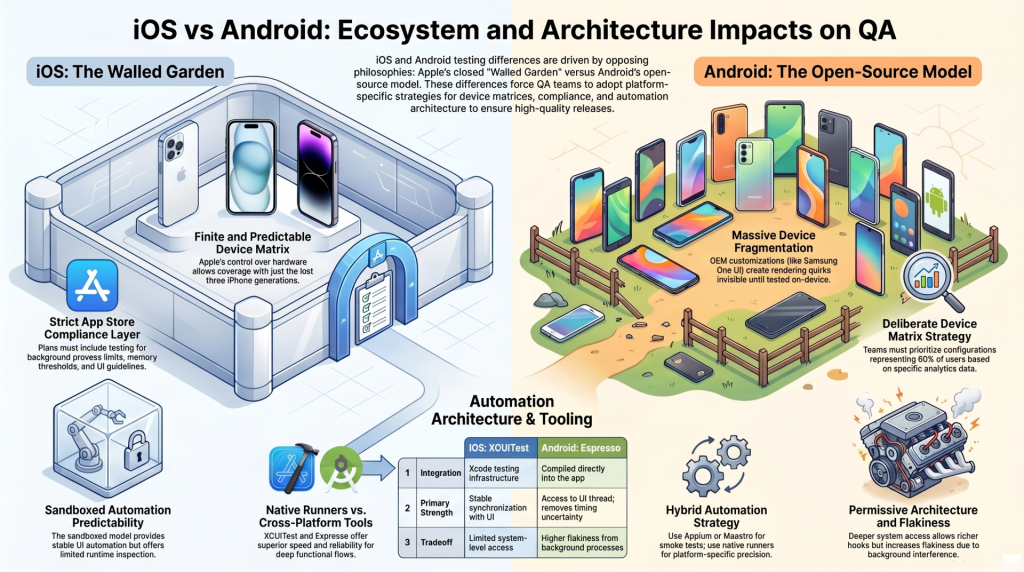
What iOS’s Walled Garden Means for Test Coverage
Apple controls the hardware, the OS, and the distribution channel. That constraint is a gift to QA teams. The number of distinct device configurations you need to cover is finite and predictable. A matrix covering the last three iPhone generations, the current iPad lineup, and the two most recent iOS versions captures the overwhelming majority of your user base.
The tradeoff is App Store compliance. Apple’s review process enforces strict behavioral policies: background process limits, memory usage thresholds, privacy permission handling, and UI guideline adherence. A build that passes your internal QA can still be rejected at submission. That means your test plan needs a compliance layer that most Android workflows simply do not require at the same level of scrutiny.
Why Android’s Open-Source Model Creates a Device Matrix Problem
Android’s openness drives its market reach and creates its most expensive QA problem. Google releases the base OS, and then every OEM (Samsung, Google Pixel, OnePlus, Xiaomi, and hundreds of others) ships their own customized variant. Each customization layer introduces rendering differences, permission handling quirks, and hardware-specific behaviors that stay invisible until you test on the actual device.
The numbers make this concrete. OpenSignal’s Android fragmentation research has tracked thousands of distinct Android device models in active use. Even restricting coverage to the top 10 manufacturers by market share still leaves QA teams managing screen densities, aspect ratios, and OS versions that span several years. Without a deliberate device matrix strategy, Android coverage becomes either impossibly broad or dangerously shallow.
How Each Platform’s Architecture Shapes Your Automation Approach
iOS enforces a sandboxed process model where apps cannot directly interact with the OS or other apps outside defined APIs. That architecture makes UI automation predictable but limits what you can inspect at runtime without instrumentation. Android’s more permissive model allows deeper system-level access, which enables richer automation hooks but also introduces test flakiness when background processes interfere with UI state.
These are not just philosophical differences. They directly determine which test runner to use, how to handle asynchronous behavior in automation, and where you set your stability thresholds before marking a test suite healthy.
Four Testing Disciplines Where iOS and Android Diverge Most
Functional Testing: Consistency vs. Combinatorial Complexity
On iOS, functional testing benefits from a smaller device matrix and consistent OS behavior. The complexity comes from Apple’s stricter permission flows and the need to validate behavior across both iPhone and iPad form factors where applicable.
On Android, functional testing is a combinatorial problem. The same user flow may behave differently depending on the OEM skin, the Android version, and whether the device uses gesture navigation or a button bar. Teams that treat Android functional testing as a copy of their iOS test cases consistently miss OEM-specific regressions. The coverage model needs to account for manufacturer-specific UI layers, particularly on Samsung One UI, which has the largest global install base of any single Android variant.
Performance and Load Testing: Memory Constraints Are Not the Same
iOS memory management operates through ARC (Automatic Reference Counting) with strict limits on background memory allocation. Android uses a garbage collection model with more flexibility at the cost of less predictable memory reclamation. A feature that performs cleanly on an iPhone 14 may trigger memory pressure warnings on a mid-range Android device with 3GB of RAM running multiple background services.
Performance testing on Android requires a broader device spectrum, specifically including low-to-mid-range hardware that represents the majority of global Android users. Testing exclusively on flagship Android devices produces performance metrics that do not reflect real-world conditions for most of your audience. iOS performance testing, while more consistent, still requires validation across older supported devices where Apple’s hardware efficiency advantage narrows.
Security Testing: App Store Policies vs. Sideloading Risk
Apple’s App Store is the only sanctioned distribution channel for iOS apps. That single-vector distribution model eliminates an entire category of security risk: sideloaded malware, repackaged app variants, and unofficial distribution channels simply cannot reach standard iOS users. Security testing on iOS focuses on API communication security, data storage in the iOS Keychain, and permission handling for sensitive system resources.
Android’s open distribution model introduces sideloading as a real attack surface. Users can install APKs from outside the Play Store, and enterprise apps are frequently distributed via MDM without Play Store review. Security testing for Android needs to include APK integrity validation, certificate pinning verification, and testing against reverse-engineered or repackaged variants. The OWASP Mobile Application Security Verification Standard provides the most current framework for structuring this testing, and its requirements differ notably between iOS and Android sections.
Accessibility Testing: Platform-Specific WCAG Compliance Gaps
Both platforms support screen readers, but they operate on different interaction models. iOS uses VoiceOver, which navigates by swipe gestures and has its own element ordering logic. Android uses TalkBack, which behaves differently in focus traversal and element announcement. A component that is fully accessible on VoiceOver can fail TalkBack in ways that are not obvious without testing on the actual platform with the actual assistive technology.
Beyond screen readers, Android’s higher device diversity introduces additional accessibility variables: font scaling behavior differs across OEM implementations, touch target sizing is not enforced uniformly, and high-contrast mode support varies by manufacturer. Accessibility testing for mobile cannot be validated with a single automated scan. Platform-native assistive technology testing is required on both, and the results need to be tracked separately.
Your Automation Framework Cannot Be Identical on Both Platforms

XCUITest and Espresso: When Native Runners Beat Cross-Platform Tools
XCUITest and Espresso are both first-party testing frameworks built specifically for their respective platforms. That distinction matters in practice. XCUITest integrates directly with Xcode’s testing infrastructure and Apple’s simulator, providing stable element access and reliable synchronization with iOS UI state. Espresso is compiled into the app under test, giving it direct access to Android’s UI thread and removing the timing uncertainty that plagues many cross-platform tools.
For deep functional flows, platform-specific UI interactions, and any test that touches permission dialogs or system-level alerts, native runners are the more reliable choice. They execute faster, produce less flakiness, and fail with cleaner diagnostic output. The tradeoff is that maintaining two separate native test suites increases the total automation engineering effort.
Where Appium and Maestro Actually Hold Up Across Both
Appium and Maestro are the two cross-platform tools with the widest adoption for teams that want shared test logic. Both perform well for smoke testing, login flows, navigation validation, and any scenario where the interaction model is genuinely identical across platforms.
Where cross-platform tools struggle: platform-specific system dialogs (camera permissions, push notification prompts, biometric authentication) and deep inspection of component rendering. Teams using Appium or Maestro effectively for both platforms typically maintain a shared layer for cross-platform flows and drop into native runners for anything that requires platform-specific precision. That hybrid approach reduces duplication without sacrificing coverage quality where it matters most.
CI/CD Pipeline Adjustments That Platform Differences Force
Running a single CI/CD pipeline for both platforms requires deliberate configuration. iOS builds require macOS build agents, which carry higher infrastructure costs than the Linux agents used for Android. That hardware dependency means teams cannot simply replicate their Android pipeline configuration for iOS.
Device testing in CI also diverges by platform. iOS simulators are fast but do not reproduce every hardware-level behavior. Android emulators cover more of the device matrix than iOS simulators but are slower and require more memory on the build agent. Physical device farms, whether managed in-house or via a cloud provider, are necessary for release-blocking regression suites on both platforms. Test automation pipelines for mobile should treat iOS and Android as parallel tracks with shared reporting, not as a single workflow with minor platform flags.
Building a Device Matrix That Does Not Collapse Under Fragmentation
A device matrix is only useful if it reflects your actual user population. For iOS, that typically means the three most recent iPhone generations, the latest iPad (if the app supports it), and the two most recent major iOS versions. That matrix is manageable and stable.
For Android, the matrix requires usage data from your analytics platform segmented by device model, screen resolution, and OS version. Without that data, you are guessing. With it, you can prioritize the configurations that represent 80 percent of your user base and build a tiered testing approach: full regression on tier-one devices, smoke testing on tier-two, and exploratory spot-checks on the long tail.
The matrix should be revisited every major OS cycle. Android’s annual OS release and Apple’s September hardware cadence both shift the distribution of devices in your user base. A matrix built in Q1 that is never updated will drift out of alignment with real user conditions by Q4.
What a Platform-Aware QA Governance Model Actually Looks Like
A governance model that treats iOS and Android as a single mobile workstream will produce coverage gaps on both. Platform-aware governance separates ownership and decision-making by platform at three levels.
First, device matrix ownership: one person or team is accountable for maintaining the Android device matrix and a separate owner manages the iOS matrix. Each owner updates their matrix on a defined schedule tied to OS release cycles.
Second, automation strategy: the team maintains explicit documentation of which tests run on native runners versus cross-platform tools for each platform, and why. That documentation prevents the slow drift where cross-platform tests get applied to scenarios they are not suited for because no one remembered the original rationale.
Third, release gates: platform-specific pass/fail thresholds for each test category. A 95 percent pass rate on iOS regression might be an acceptable release gate while Android, given its broader device matrix and higher combinatorial complexity, may warrant a different threshold calculation that accounts for known OEM-specific flakiness.
A QA process audit is often the fastest way to identify where a team’s current governance model is treating these as one problem when they are two. Outpost QA’s Enterprise Governance & QA Process Audits engagement is specifically structured to surface these gaps and build the separation that a platform-aware model requires.
If your mobile QA coverage model is not yet platform-specific, connect with an Outpost QA specialist to walk through what a structured iOS and Android coverage model looks like for your product and team.
Frequently Asked Questions
Can a single test automation framework cover both iOS and Android adequately?
Cross-platform frameworks like Appium and Maestro handle shared flows well, but they are not sufficient on their own for either platform. Deep functional tests, system dialog interactions, and performance-sensitive scenarios require native runners on each platform. Most production-grade mobile QA strategies use a hybrid approach: cross-platform tools for shared flows, native runners for platform-specific coverage.
How many devices should be included in an Android test matrix?
The right number depends on your actual user population. A common starting point is 8 to 12 physical or emulated configurations covering your top device models by usage share, segmented across at least two or three Android OS versions. A matrix outside that range is either too narrow to catch OEM-specific bugs or too broad to run consistently within a release cycle.
Is iOS testing faster than Android testing?
In most cases, yes. iOS’s smaller device matrix and consistent OS behavior reduce the number of configurations required. Android’s fragmentation adds combinatorial complexity that extends both manual and automated testing cycles. That gap widens as the Android device matrix grows, which is why matrix prioritization matters as much as tooling choice.
What is the biggest accessibility testing mistake teams make on mobile?
Running automated accessibility scans and stopping there. Automated tools catch structural issues like missing labels and contrast failures, but they cannot replicate how TalkBack or VoiceOver actually navigates the app in practice. Manual testing with each platform’s native screen reader is required to validate real user experience, and the two platforms behave differently enough that results cannot be inferred across them.
How often should a mobile device matrix be updated?
At minimum, once per major OS release cycle for each platform. Apple releases a major iOS version annually in September. Android’s major releases follow a similar cadence. In both cases, the new OS version shifts device usage distribution in your user base, and configurations that were tier-one six months ago may have dropped in relevance while new device models have entered the top tier.