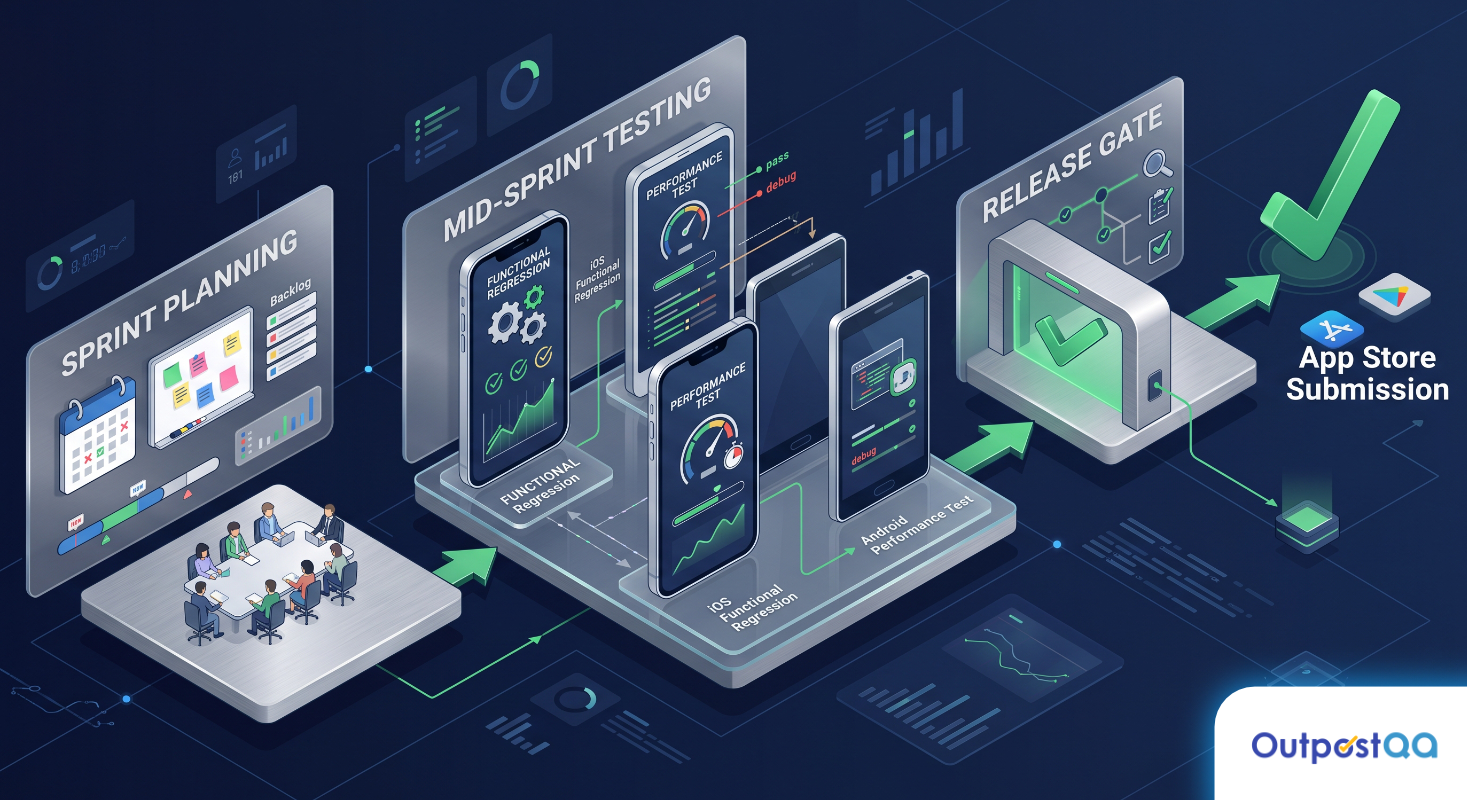
You have a launch date on the calendar. The dev team is confident. The demo looks clean. Then the reviews start coming in: crashes on Android 13, a login loop that locks users out, buttons that fall off the screen on a Pixel 7. The common mobile app bugs before launch that kill user retention are rarely the ones caught in internal demos. They surface in the real world, on real devices, under conditions no one thought to simulate.
TL;DR
- Most critical pre-launch bugs appear on specific device and OS combinations, not in controlled dev environments
- API failures, session errors, and layout breaks are the highest-frequency issues intercepted in structured mobile QA
- Standard functional testing misses performance degradation under real network conditions and accessibility barriers entirely
- A structured pre-launch interception process covers device matrices, network simulation, and WCAG compliance before a single user touches the app
- Shallow or rushed mobile testing is the direct cause of post-launch churn and brand damage
The Bugs That Kill Launch Day Aren’t the Ones You Expect
The bugs that generate one-star reviews are not usually logic errors in the core feature set. They are environment-specific failures: the app works perfectly on the iPhone 15 the developer uses daily and crashes immediately on a Samsung Galaxy A53 running Android 12. They are timing failures: the API call that returns clean data on strong Wi-Fi returns a silent error on an LTE connection with 15% packet loss.
These bugs live in the gap between how the app was built and how it will actually be used. Closing that gap before launch is what separates a successful release from a damage-control sprint.
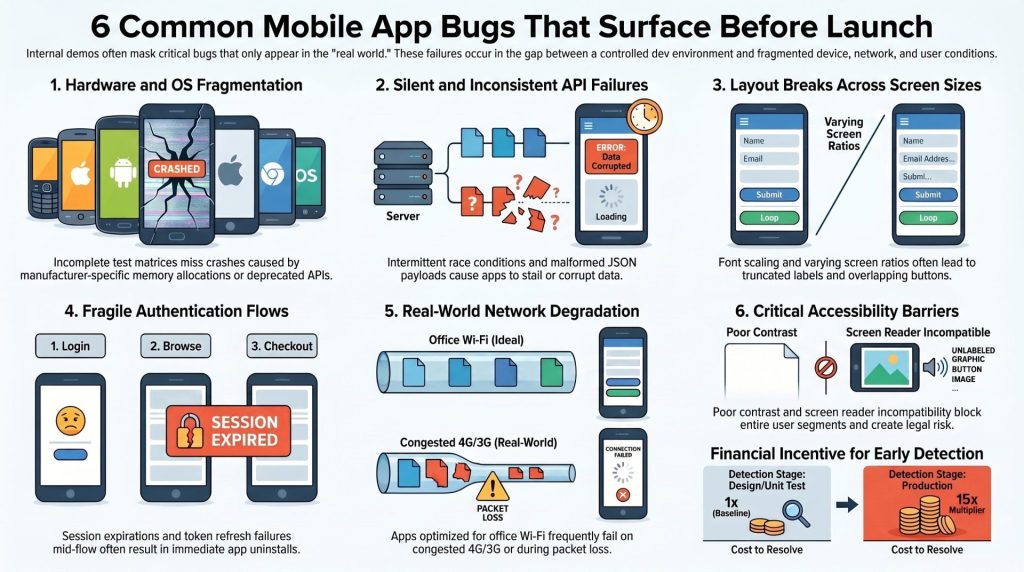
Six Common Mobile App Bugs That Surface Before Launch
App Crashes on Specific Devices or OS Versions
This is the single most reported post-launch issue in mobile apps, and it is almost entirely preventable. Crashes tied to specific devices or OS versions usually trace back to an incomplete test matrix. The app gets tested on a handful of devices the team owns, typically the latest flagship hardware, and shipped. Android fragmentation alone means your users are running hundreds of device and OS combinations you never touched.
Common triggers include deprecated APIs that still compile but fail at runtime on older OS versions, memory allocation differences between manufacturers, and hardware-specific rendering issues. A proper device matrix covers the top 10 to 15 device and OS combinations your target audience actually uses, not just the ones that are convenient to test on.
Broken or Inconsistent API Responses
Mobile apps are thin clients. The logic lives in the API, and when the API misbehaves, the app has nowhere to go. The bugs here are rarely outright 500 errors; those get caught quickly. The dangerous ones are silent failures: a 200 response with malformed JSON, a timeout that returns a cached stale state, or a race condition between two concurrent API calls that occasionally corrupts a data field.
These bugs are particularly damaging because they are intermittent. A user files a support ticket, your team cannot reproduce it, and the issue keeps happening. Structured API testing that simulates edge-case payloads, network interruptions mid-request, and concurrent call scenarios catches these before any user encounters them.
UI Layout Failures Across Screen Sizes
A layout that looks correct on a 6.1-inch display with standard font scaling can collapse on a 5.4-inch screen or a tablet, and become unusable for anyone who has bumped their system font size up for readability. Truncated labels, overlapping buttons, text that runs outside its container, and scrollable areas that do not scroll are among the most common UI failures intercepted in pre-launch mobile app testing.
These are not aesthetic problems. A button the user cannot tap is a broken feature. A label that truncates the critical part of an instruction is a broken flow.
Authentication and Session Management Errors
Authentication bugs are high-severity by definition. A user who cannot log in is a user who uninstalls the app. The failure modes go beyond a wrong-password error: sessions that expire mid-flow without a clean recovery path, token refresh failures that silently drop the user out during a transaction, biometric authentication that fails to fall back gracefully to a PIN, and deep-link behavior that bypasses authentication state entirely.
These bugs require scenario-based testing that simulates real user behavior across interrupted sessions, background/foreground transitions, and multi-device authentication flows. They do not appear in a single linear happy-path walkthrough.
Performance Degradation Under Real-World Network Conditions
Every app loads fast on the office Wi-Fi. The question is what it does on a congested 4G connection in a subway station, or on a 3G fallback in a rural area. Performance degradation under real network conditions is one of the most undercovered categories in pre-launch testing because simulating it requires deliberate network throttling and testing infrastructure that most teams do not have configured.
The symptoms are loading spinners that never resolve, infinite scroll that stalls after the first page, and video content that buffers constantly while competing with background data. Users do not file detailed bug reports about these. They leave.
Accessibility Barriers That Block Entire User Segments
WCAG compliance is not a nice-to-have. It is not just a legal consideration either, though the legal risk is real and growing. Accessibility barriers block users with visual, motor, or cognitive impairments from using the app at all. Screen reader incompatibility, insufficient color contrast ratios, touch targets smaller than 44×44 points, and unlabeled interactive elements are among the most common failures found in structured accessibility testing.
For enterprise clients and any app targeting government contracts, WCAG 2.1 AA compliance is often a contractual requirement. Discovering the gap after submission is a timeline problem.
Why Standard Functional Testing Misses Half of These
Standard functional testing verifies that features work as designed under expected conditions. That is necessary but not sufficient. It does not cover the intersection of device fragmentation with OS-specific behavior. It does not simulate network degradation. It does not test screen reader traversal order or color contrast ratios. It does not probe session state across interruptions.
The coverage gap is structural, not a matter of effort. A team running manual functional tests against a checklist will confirm that the login flow works. It will not confirm that the login flow works on 15 device configurations, under intermittent connectivity, with a screen reader active, for a user whose session was interrupted by a phone call.
Closing that gap requires a testing process built around the real failure modes, not just the happy path.
What a Pre-Launch Bug Interception Process Actually Looks Like
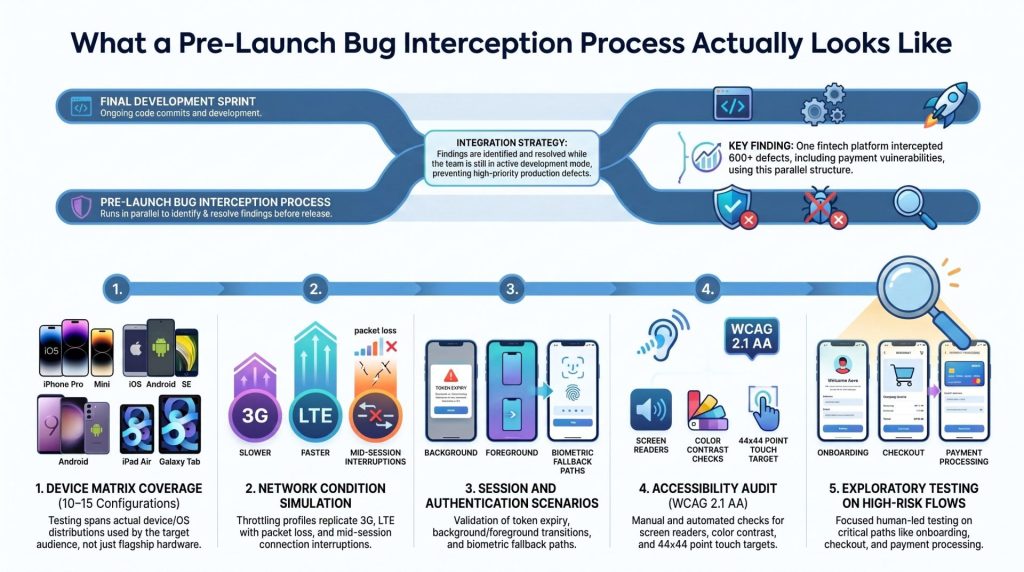
A structured pre-launch process for mobile apps runs in parallel with the final sprint, not after it. The key components are:
- Device matrix coverage: Testing against the actual device and OS distribution of the target audience, not a dev team’s personal devices. This typically means 10 to 15 device configurations at minimum, weighted toward the platforms your analytics or market data indicate your users are on.
- Network condition simulation: Throttled testing profiles that replicate 3G, LTE with packet loss, and connection interruption mid-session. This is where performance bugs and API race conditions surface.
- Session and authentication scenario testing: Scripted flows that cover token expiry, background/foreground transitions, biometric fallback, and deep-link authentication state.
- Accessibility audit: Screen reader traversal testing on both iOS VoiceOver and Android TalkBack, color contrast analysis, touch target sizing, and label completeness against WCAG 2.1 AA criteria.
- Exploratory testing on high-risk flows: Structured exploratory testing focused on the flows where a failure has the highest user impact: onboarding, checkout, authentication, and any flow involving payment or personal data.
Outpost QA runs this process as an embedded pre-launch engagement, integrating directly into the final sprint cycle so findings are actionable before the release candidate is cut. Flex, a fintech platform handling payment solutions for renters and landlords, ran this kind of structured engagement before their weekly releases and intercepted over 600 high-priority defects before they reached production, including payment vulnerabilities that would have had direct financial consequences.
If your next release cycle starts before a structured pre-launch process is in place, that is the conversation to have now. Connect with Outpost QA’s mobile app testing team before your next release cycle begins.
Frequently Asked Questions
What are the most critical mobile app bugs to fix before launch?
Crashes on specific device and OS combinations, authentication and session management failures, and broken API responses are the highest-severity bugs to intercept before launch. These directly prevent users from accessing core functionality and generate immediate uninstalls and negative reviews.
How many devices should a mobile app be tested on before launch?
A minimum of 10 to 15 device and OS configurations is a practical baseline, weighted toward the platforms your target audience actually uses. The exact matrix depends on your audience demographics and whether you are prioritizing iOS, Android, or both.
Why do bugs that appear in production not show up during internal testing?
Internal testing typically runs on a small set of developer-owned devices under ideal network conditions. Bugs tied to device fragmentation, OS version differences, real-world network degradation, and edge-case user behavior do not surface until the app reaches a broader set of conditions and users.
Is accessibility testing required for mobile apps?
WCAG 2.1 AA compliance is a legal requirement in many jurisdictions and a contractual requirement for enterprise and government contracts. Beyond compliance, accessibility failures block real users from using your product. Testing for it before launch is substantially less expensive than remediating it after a complaint or audit.
When in the development cycle should pre-launch mobile testing start?
Pre-launch testing should run in parallel with the final development sprint, not after feature completion. Starting after the code freeze means any significant findings push the release date. Running structured testing concurrently means findings are actionable while the team is still in active development mode.