


Most features that fail in production passed every test the engineering team ran. That is not a testing tools problem or a test coverage problem; it is a UAT design problem.
TL;DR
- UAT fails most often because it is scheduled at the end of the sprint with no structured scope, wrong participants, and no formal acceptance criteria tied to business requirements.
- A functioning user acceptance testing process requires seven sequential steps: requirements mapping, scope definition, participant preparation, test plan creation, environment setup, execution with triage, and formal sign-off.
- Coverage gaps in accessibility, performance under load, and security validation are the three areas most UAT processes skip entirely, and all three produce production incidents.
- Agile creates structural pressure that compresses or eliminates UAT; teams need an explicit governance mechanism to protect it.
- When internal QA capacity cannot support rigorous UAT, a dedicated external QA team can close the gap without adding permanent headcount.
What Is the User Acceptance Testing Process?
The user acceptance testing process is the structured sequence of activities that validates whether a software product meets the business requirements and real-world expectations of its intended users before it ships to production. It is the final quality gate before release, and its job is not to find every bug; it is to confirm the right thing was built correctly.
UAT sits at the end of the testing hierarchy, after unit tests, integration tests, and system tests have already run. Those earlier phases verify technical correctness. UAT verifies business correctness. A checkout flow can be technically functional and still fail UAT because the error messaging confuses real users, a discount rule applies incorrectly for a specific customer tier, or the confirmation email never triggers for mobile purchases.
That distinction defines who runs UAT and what they are looking for. UAT participants are not QA engineers checking code; they are business stakeholders, subject matter experts, or actual end users validating that the product does what the business promised it would do.
Why Most UAT Fails Before a Single Test Case Runs
The failure point is almost never in execution. It is in setup.
The most common UAT failure pattern looks like this: a sprint ends, QA has signed off on the test plan, and someone schedules a UAT session for the following Thursday. A group of stakeholders logs into a staging environment, clicks around for 90 minutes, and declares it ready. Two weeks after launch, a customer service team is fielding tickets about a workflow edge case that nobody tested because nobody thought to include it in scope.
That pattern has three root causes, and all three appear before any test is run.
No traceability to business requirements. Test cases are written against the feature spec, not the original business requirement. The spec describes what was built. The business requirement describes what the business needed. Those two documents are often not the same.
Wrong participants. Developers and QA engineers testing their own work in a UAT session is not UAT; it is regression testing with a different label. UAT requires people who understand the business process the feature is supposed to support, not the code underneath it.
No formal exit criteria. Without defined pass/fail thresholds, UAT sign-off becomes a social event. Stakeholders approve the release because the deadline is close and the feature looks good enough. “Good enough” is not an acceptance criterion.
The Complete UAT Process: Seven Steps from Scope to Sign-Off
This is the sequence that separates UAT as a real quality gate from UAT as a release ritual.
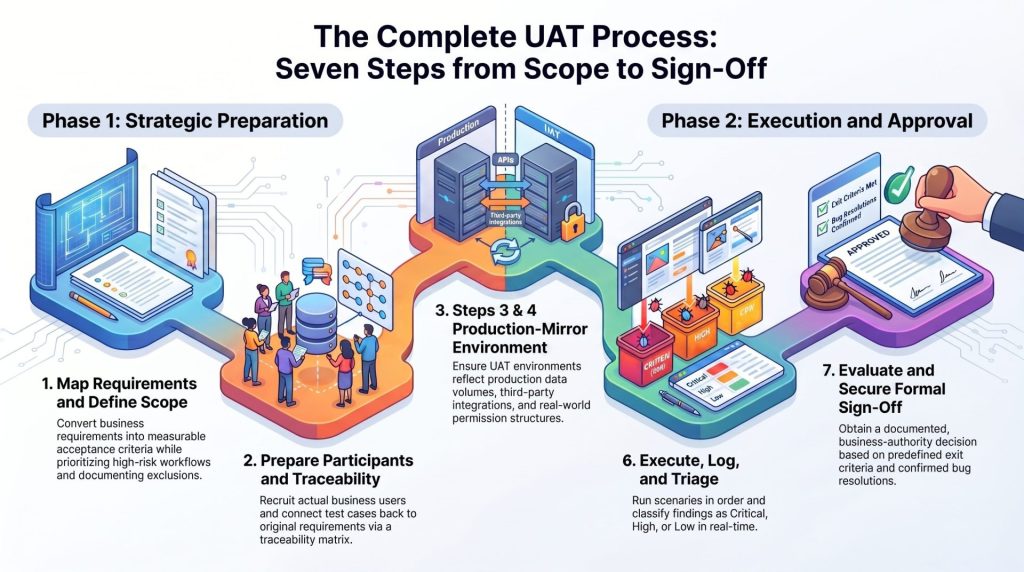
Step 1: Map Business Requirements to Acceptance Criteria
Before any test case is written, pull the original business requirements document and map each requirement to a measurable acceptance criterion. An acceptance criterion answers a specific question: under what conditions does this requirement pass, and under what conditions does it fail?
If the business requirement is “users can complete a purchase without creating an account,” the acceptance criterion is not “guest checkout exists.” It is: “A user with no account can add a product, enter payment and shipping details, and receive an order confirmation email within two minutes, without being prompted to create an account at any point in the flow.”
That specificity is what makes UAT testable. Requirements that cannot be converted into measurable acceptance criteria have not been defined clearly enough to ship.
Step 2: Define the UAT Scope and Exclusions
Scope definition is as much about what UAT will not cover as what it will. Every UAT session has limited time and limited participants; trying to test everything produces shallow coverage of everything and deep coverage of nothing.
Define scope by risk, not by feature completeness. Prioritize:
- Business-critical workflows where a failure has direct revenue or compliance impact.
- Changed functionality that touches existing user behavior, not just new features in isolation.
- Integration points where your system depends on a third-party service or data feed.
- Any workflow that has failed in a previous release cycle.
Document the exclusions explicitly. If performance testing, accessibility validation, and security checks are not in UAT scope, write that down and assign ownership to a different test phase. Unwritten exclusions become forgotten coverage gaps.
Step 3: Identify and Prepare Your UAT Participants
The quality of UAT is almost entirely determined by who runs it. The right participants are people who execute the business process the software supports in their actual job, not people who understand how the software was built.
For a B2B SaaS product, that means account managers, finance staff, or operations leads, depending on which workflow the feature touches. For a consumer product, it means actual customers or a representative sample recruited specifically for UAT.
Prepare participants before the session:
- Provide a written brief explaining what they are testing and why their role matters.
- Walk them through the UAT environment before the formal session begins.
- Give them a structured test script with step-by-step scenarios, but leave room for exploratory testing so they can surface issues the script did not anticipate.
- Establish how they should log issues: a standardized bug report format, not a Slack message.
Unprepared participants produce noise, not findings.
Step 4: Build the UAT Test Plan and Traceability Matrix
The UAT test plan documents scope, participants, schedule, environment details, entry criteria, exit criteria, and sign-off authority. It is the governance document for the UAT cycle.
The traceability matrix is the operational tool inside the test plan. It connects every test case to the acceptance criterion it validates, and every acceptance criterion to the original business requirement it traces back to. A properly built matrix answers the question “if this test case passes, which business requirement is confirmed?” for every item in the test suite.
The traceability matrix also makes risk visible. If 30% of your high-priority business requirements map to only two test cases, that is a coverage gap the matrix surfaces before execution. Without it, the gap stays invisible until production.
Step 5: Set Up a Production-Mirror UAT Environment
A UAT environment that does not reflect production is a controlled experiment with no bearing on reality. The most common gaps between UAT environments and production are: different data volumes, missing third-party integrations, different authentication configurations, and network conditions that do not reflect real user latency.
Any one of those gaps is a reason UAT can pass cleanly while production fails.
A production-mirror environment requires:
- Data that reflects real-world volume and variety, including edge cases like accounts with no purchase history, accounts with thousands of transactions, and accounts with special pricing rules.
- All third-party integrations active, not mocked, including payment processors, email delivery services, analytics platforms, and any external API the feature depends on.
- The same authentication flow, role hierarchy, and permission structure as production.
- Environment parity checks run before UAT begins, documented and signed off by the engineering team.
If a full production mirror is not feasible, document every delta and assess whether each gap introduces acceptance risk. Do not assume it does not.
Step 6: Execute, Log, and Triage UAT Findings
Execution is the phase most UAT guides focus on, and it is actually the most straightforward step if the five steps before it were done correctly.
Run test scenarios in the order defined by the test plan. Have participants execute each scenario, log their results (pass, fail, or blocked), and capture any issues using the standardized bug report format established in Step 3. Every logged finding should include: the test case reference, the steps to reproduce, the expected result, the actual result, and the severity assessment.
Triage findings in real time, not at the end of the UAT cycle. Each defect needs an immediate classification:
- Critical: Blocks a core business workflow. UAT cannot progress past this point without resolution.
- High: Does not block the workflow but produces incorrect output or a significant user experience failure.
- Medium: A degraded experience that has a workaround and no data integrity risk.
- Low: Cosmetic or edge-case issue that does not affect primary workflows.
Only critical and high findings should be capable of blocking sign-off. Determine that threshold before execution begins, not after, or the sign-off decision becomes subjective.
Step 7: Evaluate Results and Obtain Formal Sign-Off
Sign-off is a formal, documented decision, not a verbal thumbs-up in a standup. The evaluation at the end of UAT should answer four questions:
- Were all test cases in scope executed?
- Did the results meet the exit criteria defined in the test plan?
- Are any open defects classified above the acceptable threshold?
- Has the sign-off authority reviewed and accepted the results?
Sign-off should come from a named person with business authority over the feature, not a QA engineer. A QA engineer can validate that tests were run correctly; only a business stakeholder can confirm that the feature meets the business requirement it was built to satisfy.
Document the sign-off decision, the date, the open issues accepted as known defects, and the conditions under which accepted defects will be resolved post-launch. That document is your release evidence.
The UAT Coverage Gaps Most Teams Never Check
A complete seven-step UAT process still has blind spots if the scope definition in Step 2 treats functional validation as the only acceptance dimension. Three areas appear consistently in post-launch incident reports that UAT did not cover.
Accessibility and WCAG Compliance
Accessibility testing against WCAG 2.1 AA standards is not optional for products serving enterprise clients, government contracts, or any public-facing application in jurisdictions with digital accessibility laws. It is also not a check that automated scanners complete on their own; tools like Axe or WAVE catch between 30 and 57 percent of WCAG failures depending on how coverage is measured, the lower figure reflects the share of WCAG success criteria a scanner can test, the higher figure reflects the share of actual issues found in real-world audits where common failures like missing alt text and contrast errors dominate. The rest require human evaluation with assistive technologies including screen readers, keyboard-only navigation, and voice control.
UAT is the right phase to include accessibility validation because it tests real user interaction with the feature, which is exactly what accessibility compliance requires. Build WCAG checkpoint scenarios into the test plan the same way you build functional scenarios, not as an afterthought.
Performance Under Real User Load
A feature that performs acceptably for one UAT participant in a staging environment may fail completely when 500 users hit it simultaneously on launch day. Performance and load testing is a separate discipline with its own tooling, but UAT should include at minimum a basic performance acceptance criterion: “The checkout flow completes in under three seconds under concurrent user load equivalent to expected peak traffic.”
If that criterion is not in the UAT scope and exit criteria, it is not being validated before release.
Security and DevSecOps Validation
Security testing integrated into the pre-release cycle closes vulnerabilities before they reach production. UAT is not the phase for penetration testing, but it is the right phase to validate that authentication flows, permission boundaries, and data access controls behave correctly under real business scenarios.
A UAT participant with a standard user role should not be able to access admin-level data. A session that expires should not allow continued API access. Those are business requirements with security implications, and they belong in UAT scope.
UAT in Agile: Where the Traditional Process Breaks Down
The seven-step process above was designed for a world where releases happen on a fixed schedule with defined phases. Agile delivery compresses that world into two-week sprints, and the structural pressure it creates on UAT is real.
The most common failure mode in Agile UAT is displacement. UAT is planned for the last two days of the sprint. Midway through, development takes longer than estimated. UAT gets compressed to one day. The next sprint starts before issues from UAT are fully resolved. Unresolved findings carry forward, accumulate, and eventually reach production because no single sprint had enough capacity to close them.
The fix is not to abandon the seven-step process; it is to move the preparatory steps earlier. Business requirements mapping (Step 1), scope definition (Step 2), and participant preparation (Step 3) can and should happen in parallel with development, not after it completes. By the time development is done, the test plan should already exist.
Sprint-level UAT also requires strict exit criteria, because the social pressure to accept a feature and move on is highest when the team is measuring velocity. An explicit, written threshold for what constitutes a pass protects UAT from becoming a sign-off formality when the sprint clock runs out.
Three Signs Your UAT Is a Sign-Off Ritual, Not a Safety Net
Most teams do not realize their UAT process is broken until a release produces a production incident. These three patterns appear consistently in UAT processes that fail, and all three are visible before the release happens.
Participants approve without running every scenario. When UAT sessions consistently end early with sign-off granted despite incomplete test execution, the exit criteria are either too loose or the schedule is too tight. Either way, coverage is lower than the sign-off document implies.
The same types of bugs appear in production release after release. If post-launch incident reports consistently describe the same failure category (authentication edge cases, data sync errors, mobile-specific rendering failures), UAT scope is missing a scenario class that should be there. The traceability matrix, done correctly, would make that gap visible before execution.
UAT findings are resolved by the development team without retesting by UAT participants. A developer marking a bug as fixed and a QA engineer verifying the fix is not UAT closure. UAT closure requires the original UAT participant to confirm, in the UAT environment, that the business scenario now produces the expected result. Anything shorter than that is a workaround documented as a resolution.
When to Bring in a Dedicated QA Team for UAT
Internal product teams face a real capacity constraint: the people who understand the business requirements well enough to define acceptance criteria are the same people needed to keep the product moving forward. Asking them to also design and execute a rigorous UAT process splits their attention in a way that typically degrades both activities.
A dedicated QA team does not replace business stakeholders in UAT; it provides the structure, tooling, and execution discipline that makes their involvement effective. The QA team builds the test plan, maintains the traceability matrix, sets up and validates the environment, and manages the defect triage process. Business stakeholders focus on what only they can do: evaluate whether the feature meets the business requirement.
This is the model Outpost QA applies when embedded in a client’s release cycle. The QA pod integrates directly into the sprint workflow, manages the UAT infrastructure, and ensures that sign-off decisions are based on documented evidence rather than time pressure.
For teams where critical bugs are consistently reaching production despite internal testing, a QA process audit is often the right starting point. Outpost QA has run these audits for product teams across health tech, fintech, and IoT sectors, identifying the specific coverage gaps that are generating production incidents and rebuilding the test strategy from the acceptance criteria up. The Flex fintech team, for example, went from frequent production stability issues to 50 consecutive flawless weekly releases with no critical production incidents after an engagement structured around exactly this approach.
If your UAT process is not catching what it should before release, the answer is not to run UAT harder. It is to run it differently.
Frequently Asked Questions
What is the difference between UAT and QA testing?
QA testing verifies that software is technically correct: unit tests, integration tests, and system tests check that the code does what the specification says. UAT verifies that the software meets the business requirements and real-world expectations of its intended users. QA testing is run by engineers and QA professionals; UAT is run by business stakeholders or representative end users who evaluate whether the right thing was built, not just whether it was built correctly.
How long should a UAT cycle take?
Duration depends on scope complexity and the number of business requirements being validated. A focused feature UAT for a single workflow can run in two to three days if the test plan, environment, and participants are prepared in advance. A full-product UAT before a major release typically requires one to two weeks. The most common mistake is scheduling UAT time without accounting for the preparation steps that must happen before execution begins; those steps often take as long as the execution phase itself.
Who should sign off on UAT results?
Sign-off authority belongs to a named business stakeholder with direct accountability for the requirements the feature was built to satisfy. This is typically a product owner, director of operations, or department head, depending on the product context. A QA engineer or engineering lead can confirm that tests were executed correctly, but only a business-side authority can confirm that the feature meets the business requirement. Mixing up these roles produces sign-off that carries no real business accountability.
Can UAT be automated?
Some UAT scenarios can be automated, particularly regression scenarios that validate existing workflows after a new feature is introduced. However, UAT in its full definition requires human judgment: a real user evaluating whether the software behavior matches their actual business process and expectations. Automated tests can confirm that a checkout flow completes without errors; they cannot confirm that the flow makes sense to the customer running it. Automation supplements UAT; it does not replace the human evaluation component.
What happens if UAT finds critical defects close to a release date?
A critical UAT finding close to a release date is exactly the situation UAT was designed to surface. The correct response is to assess the defect against the exit criteria established in the test plan and make a documented go/no-go decision based on whether the critical workflow can be delivered safely. Shipping with a known critical defect should require a formal exception, a named decision-maker, and a documented remediation plan with a committed date. The pressure to ship regardless of a critical finding is the exact pressure that produces the production incidents UAT was supposed to prevent.